
Discord Bot
Nika can post Guild Wars Reforged build updates into a Discord channel chosen by your server admins.
Update posts include the build number, available changelog, and website link. File size display and Gw.exe attachments are disabled by default and can be enabled per server.
Set Up Nika
- Invite the botUse the invite button and choose the Discord server where Nika should announce Guild Wars Reforged updates.
- Pick an update channelRun
/watch <channel>or/watch_here. The command is available to server administrators and members with Manage Server permission. - Choose display optionsRun
/display_file_sizeor/attach_gw_fileif your server wants update posts to include the file size or downloadedGw.exe. - Check recent buildsUse
/latest,/versions, or/version <build>whenever someone wants the current executable or an older known build.
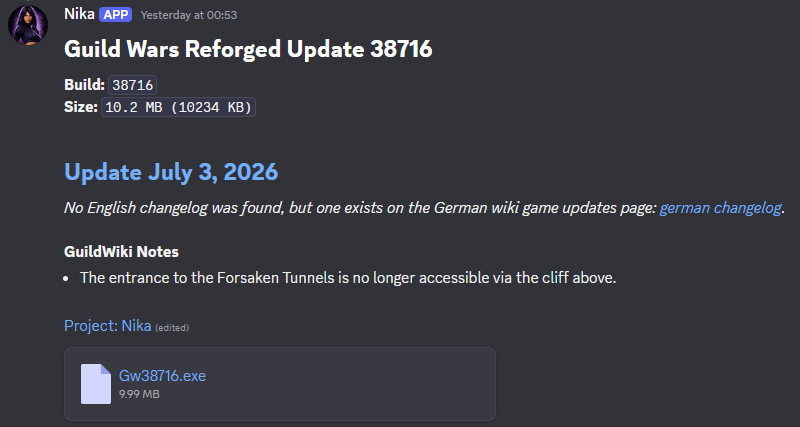
After a watch channel is configured, Nika posts future Guild Wars Reforged build updates there.
Announcements include the build number, changelog, and website link.
Each Discord server has its own setting for whether update posts show the file size.
Each Discord server has its own setting for whether update posts attach Gw.exe.
If the English wiki changelog is missing, Nika can use another language page and link the original source.
/latestPosts the newest downloaded Guild Wars Reforged build announcement.
/version <build>Posts the same kind of announcement as /latest, but for a specific downloaded build.
/versionsLists recent downloaded Guild Wars Reforged builds.
/watch <channel>Sets the channel where Nika should post automatic update announcements.
/watch_hereUses the current channel for automatic update announcements.
/display_file_sizeEnables or disables file size display for update posts in this server.
/attach_gw_fileEnables or disables Gw.exe attachments for this server.
/stop_watchingDisables automatic update announcements for the server.